Learn what an ERP system is, how enterprise resource planning works, core modules, and how leading cloud ERP platforms compare for your business.
What Is an ERP System? Business Meaning, Core Modules, and Vendor Guide
Every growing company eventually hits an operational wall where spreadsheets, disconnected accounting tools, and manual email approvals start costing real money. Sales promises delivery dates without knowing current warehouse stock. Finance spends two weeks at the end of every month reconciling numbers from three different databases. Purchasing reorders raw materials based on guesswork because nobody updated the inventory sheet after Tuesday's production run.
That operational friction is the exact problem enterprise resource planning (ERP) was built to solve. If you are researching the ERP meaning in business, trying to understand how modern cloud platforms operate, or evaluating enterprise options like Oracle ERP Cloud alongside competing systems, you need more than a textbook definition. You need to understand how these systems connect daily workflows, which modules actually matter, where implementations go wrong, and how to choose the right architecture for your organization.
What Does ERP Stand For? The Core ERP Definition
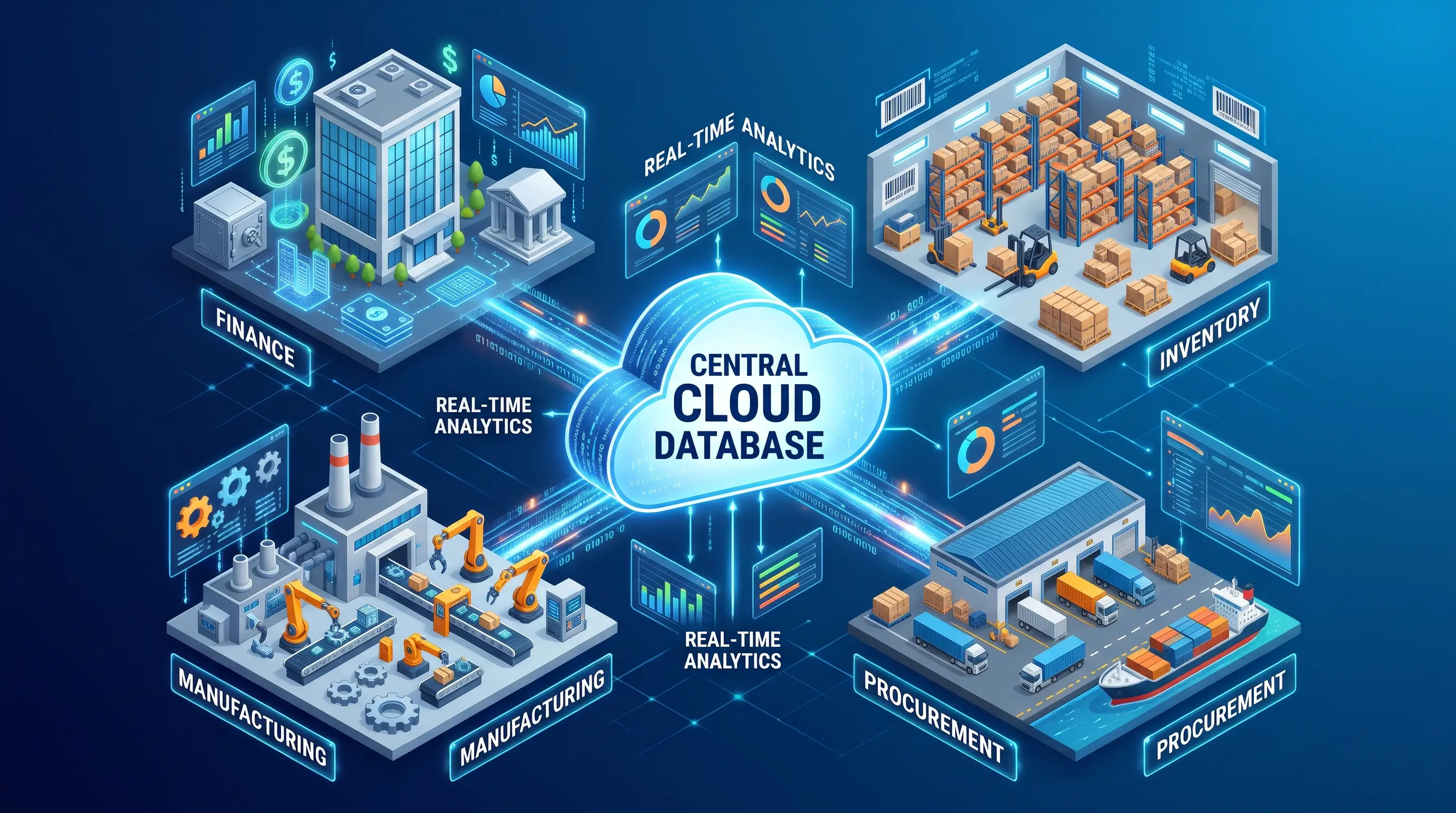
ERP stands for enterprise resource planning (Oracle). At its core, the ERP definition refers to an integrated software system that organizations use to manage, automate, and connect their day-to-day business activities—including accounting, procurement, inventory, supply chain operations, manufacturing, project management, and human resources—within a single shared database (Oracle, SAP).
When people ask "what does ERP mean?" or search for the meaning of ERP, they usually want to know how it differs from the individual software tools they already use. Without an ERP system, each department runs its own isolated software:
-
Finance uses standalone accounting software to track invoices and general ledger entries.
-
Warehouse staff use a separate inventory tool or spreadsheet to count stock.
-
Sales logs customer orders in a Customer Relationship Management (CRM) platform.
-
Human Resources manages payroll and employee records in an isolated HR portal.
Because those tools do not share a database, employees export CSV files, copy and paste order numbers, or rely on fragile connectors to move information between departments. An ERP system replaces those silos with a unified architecture where every team reads from and writes to a single source of truth (Oracle, Dreher Consulting).
How ERP Evolved from Factory Floors to the Cloud
Understanding where ERP systems came from explains why they work the way they do. In the 1960s, manufacturers built Material Requirements Planning (MRP) software to calculate what raw materials were needed for production (NetSuite). In the 1980s, Oliver Wight expanded this into Manufacturing Resource Planning (MRP II), connecting shop-floor scheduling with capacity planning and basic financials (Dreher Consulting).
By 1990, research firm Gartner coined the term "enterprise resource planning" for a new generation of business software that brought finance, human resources, procurement, and sales under the same database foundation (NetSuite). Modern ERP has since shifted from on-premises servers to cloud Software-as-a-Service (SaaS) suites that update continuously and embed analytics into daily workflows (IBM, TechTarget).
How an ERP System Works in Practice
Generic guides often say "ERP integrates business processes" and leave it at that. To see what ERP software meaning looks like in practice, consider what happens when an industrial equipment distributor receives a customer order for 50 commercial water pumps.
Without an ERP System: Disconnected Handoffs
-
Sales: A rep confirms the order via email and logs it in a standalone CRM, promising delivery in five days based on last week's stock report.
-
Warehouse: The order arrives as a PDF in the warehouse, where the manager realizes only 30 pumps are in stock because another rep sold 25 units yesterday.
-
Purchasing: The warehouse manager emails purchasing to order 20 more pumps, triggering an expensive rush order.
-
Accounting: Days later, a clerk manually keys shipment details into accounting software using an outdated price list.
With an Integrated ERP System: Automated Flow
Here is how that exact same order moves through a modern ERP system:
-
Live Order Entry: Before confirming delivery, the sales rep sees real-time inventory across all warehouses, plus the customer's live credit limit and contract pricing (Arrow).
-
Instant Inventory Allocation: Submitting the 50-pump order immediately reserves the 30 units in stock and sends a digital pick ticket to warehouse scanners.
-
Automated Procurement Trigger: Because stock fell below the safety threshold, the system automatically creates a purchase requisition for the remaining 20 units using pre-approved supplier lead times and pricing.
-
Simultaneous Financial Posting: As goods ship and supplier deliveries arrive, the general ledger, accounts payable, accounts receivable, and cost of goods sold (COGS) update automatically (Arrow).
-
Executive Visibility: Management dashboards reflect updated cash flow forecasts and order margins in real time (Cloud4C).
Visual Suggestion 1: Order-to-Cash Workflow
Visual suggestion: Two-lane flowchart comparing manual email handoffs across Sales, Warehouse, Purchasing, and Finance against an automated order-to-cash workflow in a central ERP database.
Suggested placement: After the "With an Integrated ERP System: Automated Flow" section.
Suggested alt text: Flowchart comparing manual order processing with an automated ERP system workflow.
Core ERP Modules and What Each Area Handles
Modern ERP systems use a modular design so companies can deploy the specific components they need while sharing one underlying database (IBM, Oracle ASEAN).
| ERP Module | What It Handles | Business Benefit |
|
Finance & Accounting |
General ledger, accounts payable/receivable, fixed assets, tax compliance, and multi-currency consolidation (Oracle Middle East). |
Speeds up the monthly financial close and provides real-time cash flow visibility (Arrow). |
|
Procurement & Purchasing |
Supplier qualification, requisitions, automated purchase orders, and three-way invoice matching (Oracle). |
Controls off-contract spending and enforces negotiated vendor pricing. |
|
Inventory & Warehouse |
Multi-location stock tracking, lot/serial tracing, reorder automation, and pick-pack-ship workflows (Microsoft). |
Prevents stockouts and lowers inventory carrying costs. |
|
Manufacturing & MRP |
Bill of materials (BOM), shop-floor scheduling, material requirements planning, and quality control (Dynamics Square). |
Aligns production schedules with actual demand and tracks true unit costs. |
|
Supply Chain (SCM) |
Demand forecasting, logistics coordination, supplier risk monitoring, and distribution planning (Oracle Docs). |
Reduces lead times and builds resilience against supply disruptions. |
|
Human Capital (HCM) |
Employee records, payroll, time tracking, benefits administration, and talent management (ERP Research). |
Connects labor costs directly to project budgets and production runs. |
|
Project Management |
Project budgeting, resource allocation, milestone billing, and profitability tracking (Oracle Docs). |
Ensures accurate client billing and real-time project margin tracking. |
Visual Suggestion 2: Modular ERP Architecture
Visual suggestion: Hub-and-spoke diagram showing a central cloud database connected to Finance, Procurement, Inventory, Manufacturing, Supply Chain, HR, and Project modules.
Suggested placement: Below the Core ERP Modules table.
Suggested alt text: Modular ERP architecture diagram connecting core business functions to a single database.
ERP vs. Accounting Software vs. CRM: Key Differences
Growing businesses often wonder whether they need an ERP system or if upgrading their accounting tool and connecting a CRM is enough. While these tools overlap, they solve different problems (Arrow).
-
Standalone Accounting Software (QuickBooks, Xero, Tally): Records completed financial events like invoices, bank reconciliations, and tax filings (Arrow). It cannot manage multi-level manufacturing bills of materials, warehouse bin locations, or automated multi-entity consolidations (NetSuite, VJM Global). Accounting is just one module inside a full ERP software suite (NetSuite).
-
Customer Relationship Management (CRM): Manages front-office customer interactions, including marketing campaigns, sales pipelines, and support tickets (IBM, SAP).
-
Enterprise Resource Planning (ERP): Manages back-office execution after a sale closes—credit checks, inventory allocation, production, shipping, invoicing, and financial reporting (SAP, First Distribution).
| Dimension | Standalone Accounting | CRM Software | Full ERP System |
|
Core Purpose |
Recording financial transactions (Arrow). |
Managing sales pipelines and customer relationships (IBM). |
Unifying finance, supply chain, manufacturing, and HR (SAP). |
|
Operational Control |
None; tracks accounting after the fact (Arrow). |
Front-office sales and service workflows (First Distribution). |
End-to-end warehouse, production, procurement, and finance (Oracle). |
|
Multi-Entity Scale |
Limited; often requires separate company files. |
Tracks accounts globally, not financial ledgers. |
Automated intercompany eliminations and multi-currency (VJM Global). |
How Oracle ERP Cloud Fits into the ERP Landscape
As organizations replace legacy servers or outgrow entry-level tools, cloud-native platforms lead the market. For upper-mid-market and enterprise organizations, Oracle ERP Cloud (officially Oracle Fusion Cloud ERP) is one of the most widely deployed suites worldwide (Opkey).
Oracle offers two main cloud ERP products for different company sizes:
-
Oracle Fusion Cloud ERP: Designed for mid-to-large enterprises needing deep financial governance, Enterprise Performance Management (EPM), and complex global operations (Oracle, ERP Research).
-
Oracle NetSuite: Built for fast-growing small and mid-sized businesses (SMBs) seeking an all-in-one cloud suite with faster deployment (Boyang CS).
Core Strengths and Trade-Offs of Oracle ERP
Within the Oracle Fusion Cloud Applications Suite, Oracle ERP stands out in three key areas:
-
Financial Management and EPM Depth: Industry benchmarks consistently score Oracle highest in finance, accounting hub automation, revenue management, and corporate EPM budgeting (ERP Research).
-
Single Fusion Data Model: Financials, Procurement, Project Portfolio Management, Risk Management, Supply Chain (SCM), and Human Capital Management (HCM) run on one common data model (Oracle, Oracle Docs).
-
Embedded Automation and Quarterly Updates: Optical character recognition (OCR) for invoices, predictive cash forecasting, and quarterly multi-tenant SaaS updates keep the platform current without disruptive multi-year upgrades (Oracle Middle East, Cloud4C).
On the trade-off side, independent analyses note that Oracle's CRM (Oracle CX) is licensed as a separate pillar requiring integration planning, and full Fusion rollouts demand structured governance, higher budgets, and longer timelines than mid-market tools (ERP Research, Sedin Technologies).
Comparing Top ERP Systems: Oracle, SAP, Microsoft Dynamics 365, and Odoo
No single ERP system is universally "the best." Comparing Oracle ERP, SAP ERP, Microsoft Dynamics 365, and Odoo ERP highlights where each platform fits best:
| Platform | Best Suited For | Key Strengths | Notable Trade-Offs |
|
Oracle Fusion Cloud ERP |
Upper mid-market to large global enterprises (ERP Research). |
Industry-leading financials, EPM budgeting, procurement, risk controls, and unified HCM/SCM (Oracle, ERP Research). |
Higher licensing/consulting costs; requires formal change management (ERP Research). |
|
SAP S/4HANA Cloud |
Large enterprises, complex global manufacturers, and asset-heavy industries (Tractian). |
Deep shop-floor manufacturing, complex global supply chains, and high-volume transaction processing (SAP, Sedin Technologies). |
Steep learning curve, complex licensing, and high total cost of ownership (DynaTech). |
|
Microsoft Dynamics 365 |
SMBs (Business Central) to large enterprises (Finance & SCM). |
Native integration with Microsoft 365 (Excel, Teams, Outlook), Power BI, and Azure; familiar UI (First Distribution, Rizwin Azeez). |
Implementation quality varies by partner; complex setups often rely on third-party add-ons. |
|
Odoo ERP |
Startups, small businesses, retail, e-commerce, and agile mid-sized firms (ERP Research). |
Open-source core, low entry cost, clean interface, and modular apps for CRM, POS, e-commerce, and MRP (Odoo, OBS Solutions). |
Heavy custom code complicates upgrades; less native multi-country compliance depth than Tier-1 suites (Sedin Technologies). |
Visual Suggestion 3: ERP Vendor Matrix
Visual suggestion: Quadrant chart plotting "Company Size & Budget" against "Operational & Financial Complexity" for Odoo, Business Central, NetSuite, Dynamics 365 Finance, Oracle Fusion Cloud, and SAP S/4HANA.
Suggested placement: Below the Comparing Top ERP Systems table.
Suggested alt text: Matrix chart comparing ERP vendors by organization size and operational complexity.
Benefits, Limitations, and Selection Checklist
Why Businesses Invest in ERP
-
Single Source of Truth: Finance, sales, and operations work from identical live numbers (Oracle, SAP).
-
Faster Financial Close: Continuous sub-ledger posting cuts days off monthly accounting closes (Arrow).
-
Tighter Working Capital: Automated demand forecasting and reorder points reduce stockouts and excess inventory (Dynamics Square).
-
Audit Readiness: Digital approval workflows and user timestamps simplify tax compliance and statutory audits (Oracle).
Why ERP Projects Fail (And What to Check Before Buying)
Gartner has projected that over 70% of ERP initiatives fail to fully meet their original business case goals (Alpha Apex Group), and Panorama Consulting Group research shows more than a quarter exceed initial budgets (ECI Solutions, VJM Global).
Follow four rules before signing a contract:
-
Avoid Over-Customization: Rewriting ERP code to mimic broken legacy habits inflates bills and breaks cloud updates (Sedin Technologies).
-
Clean Master Data Early: Moving duplicate vendor records and obsolete SKUs into a new database only produces bad reports faster (Panorama Consulting Group).
-
Prioritize Change Management: Vet the implementation partner's exact industry track record, and involve warehouse staff and accountants in testing early (ERP Research, VJM Global).
-
Budget for Full TCO: Consulting, data migration, integrations, and training typically equal 1x to 2x the first-year subscription (Flowscope).
Internal Linking Note: Link "monthly financial close," "inventory carrying costs," and "change management" to your site's accounting, supply chain, and implementation service pages.
Frequently Asked Questions (FAQ)
What does ERP stand for?
ERP stands for enterprise resource planning (Oracle). Coined by Gartner in 1990, the term describes integrated software that manages core business resources—cash, materials, production capacity, and staff—in one system (NetSuite).
What is an ERP system in simple terms?
An ERP system is a central software platform that lets different departments - finance, purchasing, warehouse, manufacturing, and HR - work from one live database instead of emailing spreadsheets back and forth (SAP).
What does ERP software do daily?
ERP software automates core transactions: processing sales orders, tracking stock, generating purchase orders, scheduling manufacturing, paying bills, running payroll, and updating financial statements (Oracle).
What is Oracle Fusion Cloud ERP?
Oracle ERP Cloud (Oracle Fusion Cloud ERP) is a cloud enterprise resource planning suite for mid-to-large organizations (Oracle). It unifies financials, procurement, projects, risk compliance, and EPM with embedded analytics and quarterly updates (Oracle Docs, Cloud4C).
How is ERP different from accounting software?
Accounting software only records financial history like invoices and bank balances (Arrow). An ERP system includes full accounting plus operational modules for inventory, procurement, manufacturing, and supply chain (NetSuite).
Conclusion: Turning ERP Research into the Right Decision
Understanding what an ERP system does comes down to seeing how information moves across your business. When accounting, inventory, purchasing, and production live in separate tools, teams spend their week fixing reconciliation errors instead of serving customers. Bringing those workflows onto a single shared database turns fragmented data into coordinated execution (Oracle).
Whether your organization requires the financial governance and enterprise scale of Oracle ERP Cloud, the industrial manufacturing depth of SAP S/4HANA, the familiar interface of Microsoft Dynamics 365, or the modular flexibility of Odoo, software is only half the equation. Gather your finance, operations, and IT leads to document your three biggest workflow bottlenecks and audit your master data before scheduling vendor demos.
Written by IAT Editorial
Our engineering and design teams collaborate to share deep-dive insights on the future of software, automation, and digital economics.